We are pleased to announce the latest Wiki update dubbed the "Content-aware update". As the name suggests, the Wiki is now able to interact with game file and display various dynamic information about in-game content on the web.
🧭 In addition, we have upgraded the project page layout and introduced "Content pages", a new type of pages that follow a traditional wiki-style layout you're used to seeing on wikis across the web.
🛠️ Behind the scenes, several improvements were made to the developer dashboard to reflect the changes to projects, and we have also reworked how projects are deployed to make transitions between revisions smoother and safer in case something goes wrong.
📖 Last but not least, we have launched a new meta-documentation website for project authors to learn how to use the wiki at docs.moddedmc.wiki.
Now, let's get into the details below.
Changes to project wikis
You might have noticed that after navigating to a project from the Browse page, you're taken to a new project-wide homepage whereas the documentation now resides in its own tab. While most project will currently only display the "Documentation" tab, this change was made to enable other types of content / pages to exist within the project. Plus with an independent homepage, it's easier to display project highlights and important links.
So far, a single page type has existed on the wiki, and has been used to host all kinds of documentation, from in-game items to developer api guides. However, different types of docs also fit different layout styles. When describing an in-game object, you'll find it useful to have important information shown in a sidebar while recipes and crafting usage are added to the body of the page.
The same goes for api and developer docs or plain tutorials, which do not revolve around a single subject but describe multiple of them. In such cases, a guidebook-like layout will be a better option.
This brings us to one of the key points of this update - "Content pages", which follow a traditional Wiki layout intented to be used for in-game blocks, items, entities and pretty much any other in-game content. When added to a project, these can be found under the "Content" tab next to "Documentation.
As an example, check out the wiki for Modular Force Field System. Does the layout look familiar?
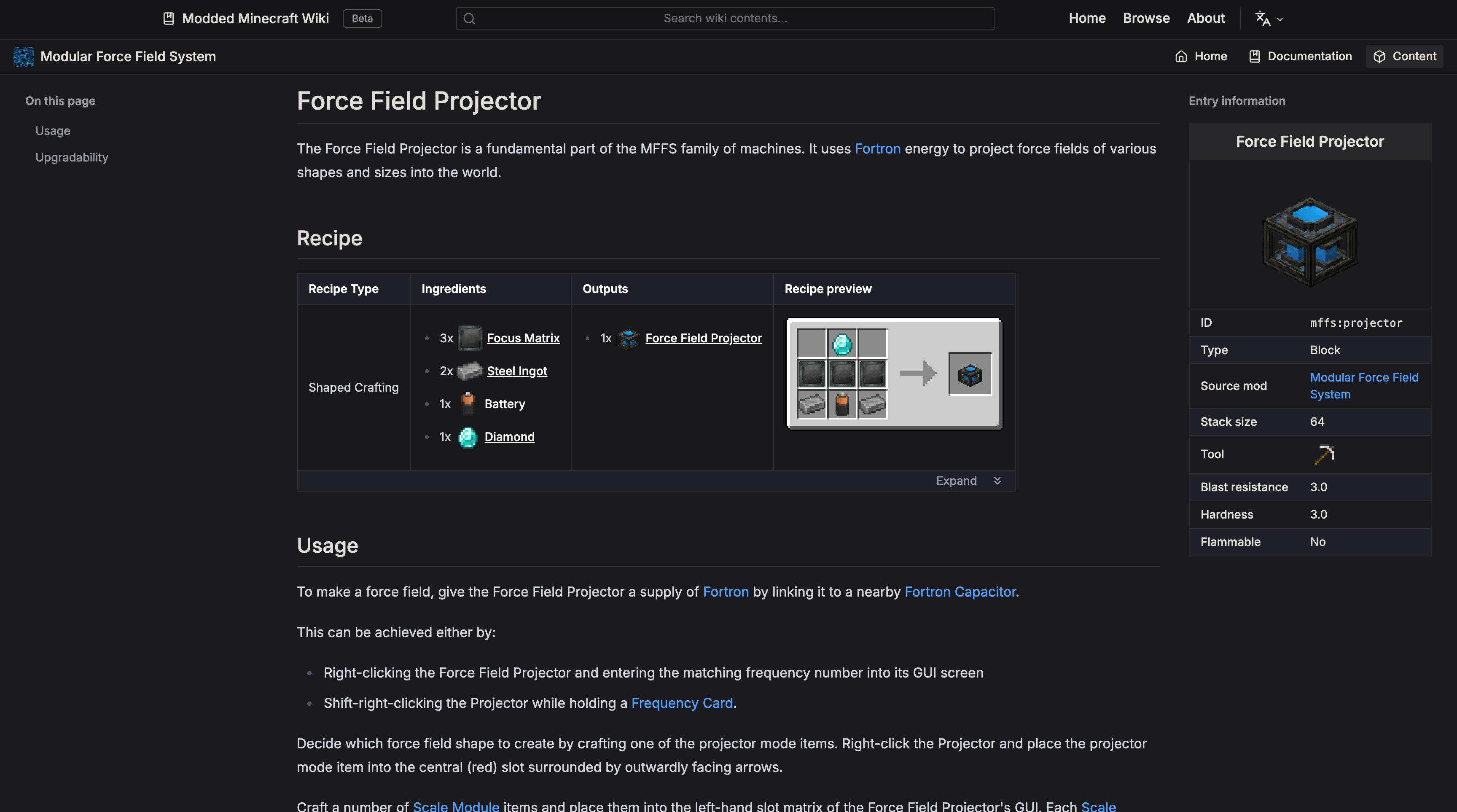
Surely from a user standpoint, this might not seem like much, but it makes life a lot easier for project authors.
Changes to authoring projects
When designing content pages, we wanted to go beyond just changing the page layout to match traiditional wikis. Aside from writing the actual documentation contents, authors must also deal with copying precise in-game values to be displayed on wiki, not to mention computed runtime data such as tag item entries.
To make our authors' lives easier and allow them to focus writing on what's important, we've added game integration features to the wiki that let you simply copy the files you need into the wiki from your mod/project.
Interactive components
As part of game data integration, we've added support for importing in-game files into wiki projects, such as tags and recipes.
The recipe display you're seeing in the example content page above has been fully generated by the wiki. From an author standpoint, displaying a recipe now boils down to two trivial steps:
- Copy your recipe JSON file into
.data/<modid>/recipe/in your wiki project - Put
<PrefabObtaining/>anywhere in your content page
There, done! The wiki will read the item id of the content page and find the corresponding recipe(s) for that item. In addition, we also support displaying recipe usage which shows what items can be crafted using your item.
We're eager to expand game integration capabilities and will be adding further components in future updates.
Easy data extraction
Let's take a look at the sidebar now. It displays various properties of the block, such as the max stack size, required tool to break, blast resistance etc.
This data has not been written manually. Instead, it was generated using out in-house game data extraction tool - the Wiki Data Exporter.
It is an easy-to-install mod that you can add to your dev environment and let it automatically extract game data when you run the game. It's even easier if you have the Wiki Toolkit Gradle plugin installed, which configures the exporter to output files directly into your wiki project directory.
The extractor can also create accurate 3D renders of your blocks as they appear in your inventory in-game.
Safely deploy new versions
We've revamped the project reload system, which used to be a single button that would "magically" load the latest changes from the source repository but with little to no feedback to the author. As a result, project issues were often missed or diagnosing them was difficult because their cause was not reported properly.
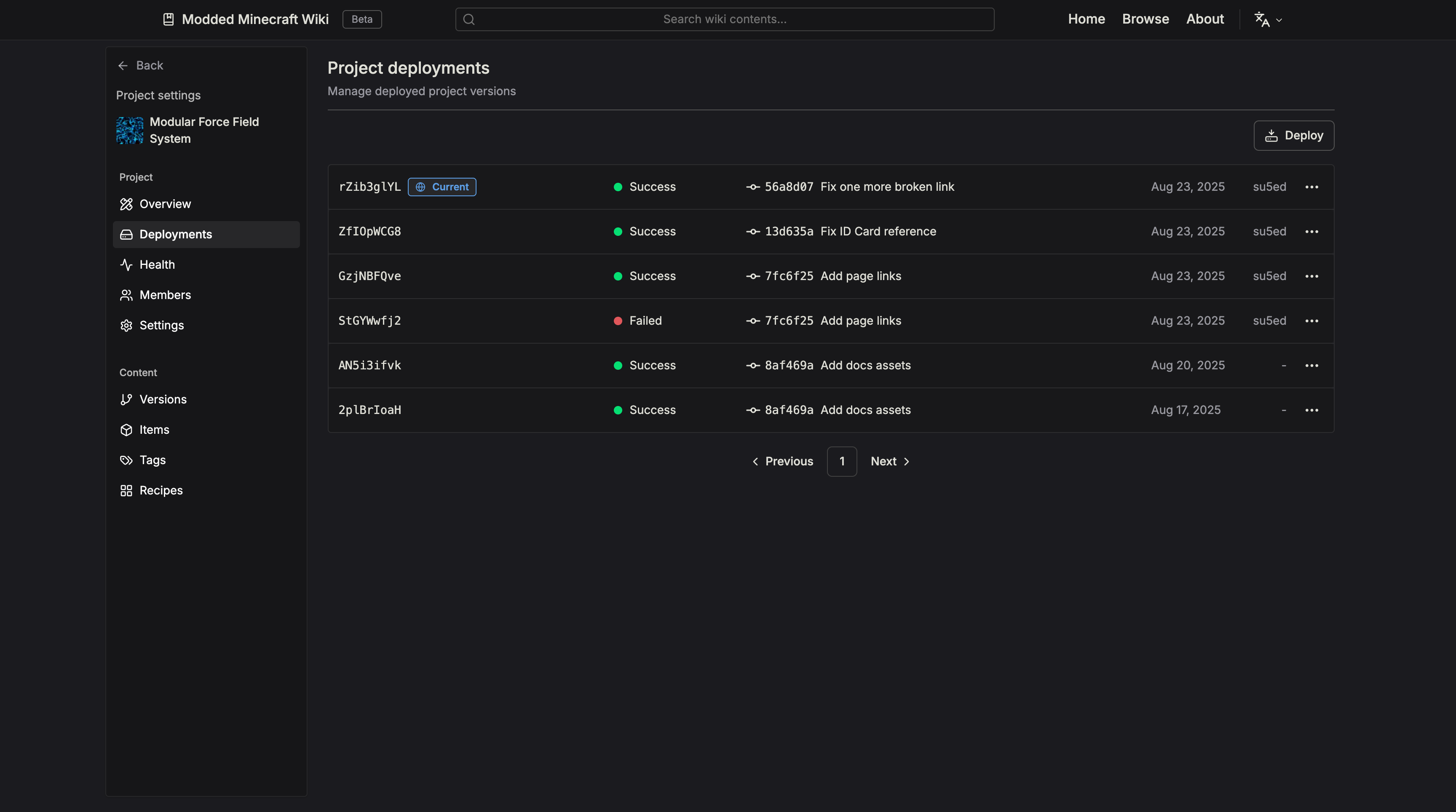
Deployments are the new way of managing active project versions and version history through a familiar interface. Each time you deploy your project, a new deployment is created for the latest git commit on the active branch, which the wiki sets up and publishes on the website.
Never worry about bricking your wiki again
If a new deployment fails, it will not replace the currently active deployment. This allows you to make experimental changes to your docs without having to worry about accidentally breaking your current pages if your new version contains errors (e.g. invalid syntax, missing file, configuration issues).
Monitor project issues
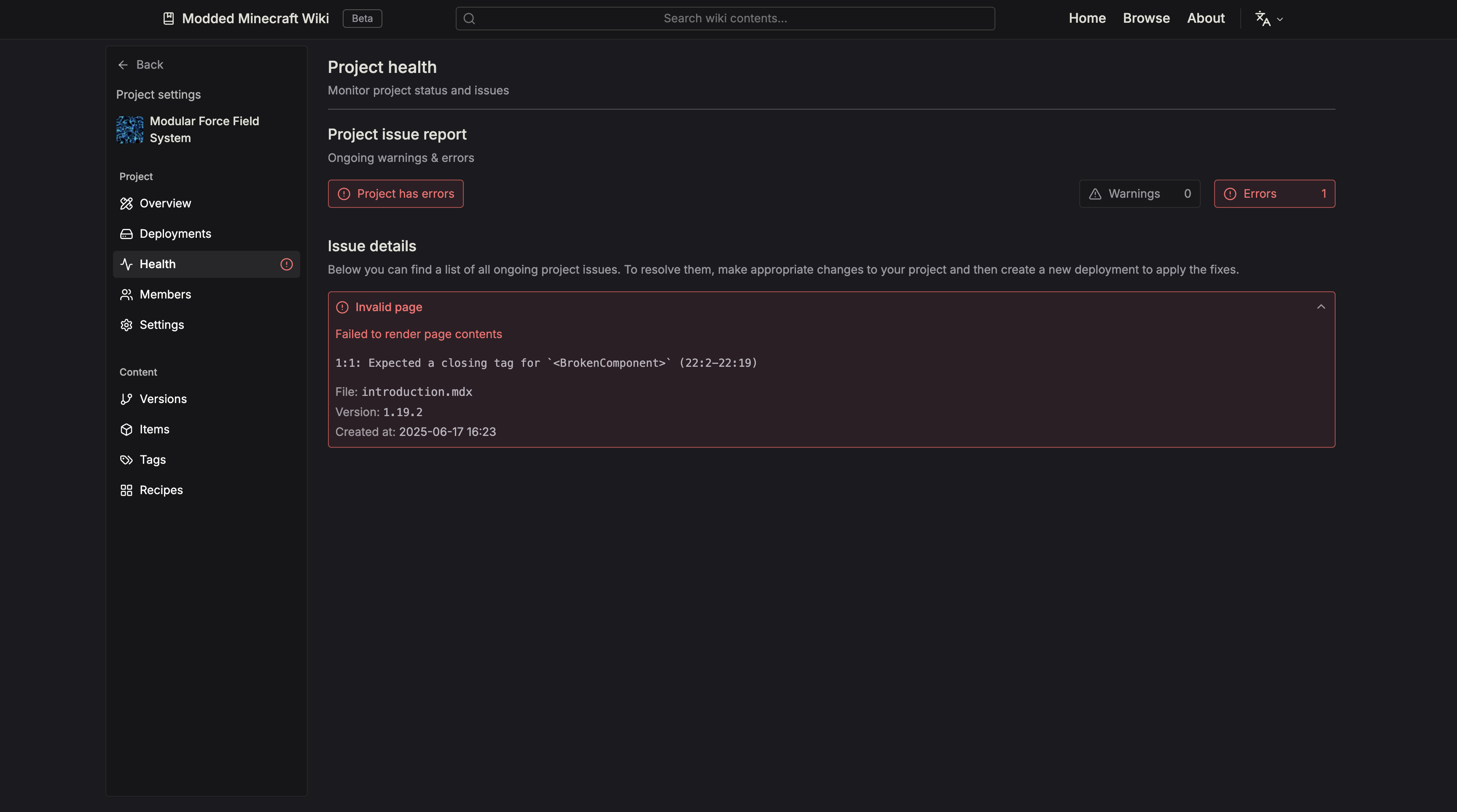
The author dasboard now includes a Health tab that informs you about ongoing issues in your project, from failed deployments to page rendering errors or deprecated usage.
Each issue will display useful information about the error, its file of origin, as well as the precise details of the problem.
Common issues will include:
- Page is missing a title
- Invalid Markdown syntax
- Invalid Resource Location used in asset reference / page id
- Unknown recipe type
- ...and more
To resolve issues with your project, you'll need to make appropriate changes to the project source and then load them onto the wiki by creating a new deployment.
Improved Markdown format
To make writing pages even more convenient, we're introducing new Markdown link shorthands that can be used to display assets or link to other pages. No more need to use verbose html component syntax or tag properties.
Assets
Display any asset image using native markdown syntax by specifying the asset location prefixed with @.
For example:
<!-- Will display: <root>/.assets/examplemod/generator.png -->

Content page links
To link to Content pages, use the ID metadata attribute of the page you want to link to, prefixed with @.
For example:
<!-- Uses page title as link text -->
[](@examplemod:electric_furnace)

<!-- Uses custom link text -->
Click [here](@examplemod:electric_furnace) to learn more.
Documentation page links
To link to Documentation pages, use the path of the page you want to link to (relative to the project root),
prefixed with $.
For example:
<!-- Uses page title as link text -->
[]($tutorials/getting_started)

<!-- Uses custom link text -->
Click [here]($tutorials/getting_started) to read the first tutorial.
Reworked author guide
We've rewritten our author guide from the ground up to make it up-to-date with the latest wiki features using an intuitive layout including examples and hints in many places.
The new documentation can now be found at docs.moddedmc.wiki.
We hope authors will find it easier to get started using our Wiki to document their project. If you have any feedback to what could be improved, please make sure to let us know!
System changes
There's a lot of smaller changes we didn't over in this blog post that were made to the Wiki. If you're an author, we highly suggest you go check out the new documentation website and explore all the wiki's features.
On another note, we've also made cosmetic changes to the wiki layout:
- Shrunk website font
- Updated browse page styles
- Cleaned up color scheme
Roadmap
✅ In this major update, we made the following changes:
-
🛠️ Developer dashboard overhaul (2nd)
-
📘 Introduced content pages for document in-game items
-
🧑🍳 Added interactive recipe components as well as custom recipe types
-
🛟 Safe project deployments
-
📖 Reworked author documentation
-
✍️ New markdown extensions for authors
🏗️ Features to look forward to, coming in the near future:
-
🎥 Embed YouTube videos in pages
-
🔍 Search locally in a single project
-
🏠 Project homepage customization
-
⌛️ Rollback projects to previous deployments
-
...and more!
🤝 Let us know what you think!
Our team is working hard on improving the website's interface and feature set to bring you the next generation wiki for all of modded minecraft.
As always, please make sure to let us know if you have any suggestions or ideas we could implement on the wiki! Any feedback is appreciated!